TL;DR: You can make your first OpenAI API call in about 15 minutes: create an account at platform.openai.com, add credits to your billing account, generate a secret API key, then send a request with Python or curl. The cheapest current model, GPT-6 Luna, costs $0.10/$0.50 per 1M input/output tokens — your first test request costs a fraction of a cent. Model prices and rate ৳123.45/USD checked 14 October 2026.
Most tutorials on the OpenAI API assume you already have an account, a key, and credits. This one starts at zero: account creation, billing, your first key, your first request, and what each line of it costs. No step skipped, no prior knowledge assumed.
Step 1: Create your OpenAI account#
Go to platform.openai.com and sign up — email plus password, or sign in with an existing Google or Microsoft account. Verify your email address when the confirmation arrives. This gives you a Platform account, which is separate from a ChatGPT account: the API is a paid, per-token service billed through the Platform dashboard, not through a ChatGPT subscription.
After signing in, you'll land on the dashboard — this is your home for API keys, billing, and usage graphs.
Step 2: Add a payment method and buy credits#
The API is pay-as-you-go: you prepay for credits, and each request deducts the token cost from your balance. In the dashboard, open Billing, add a payment method (credit or debit card), then purchase credits. Credits don't expire on active accounts, and you can start small — many guides recommend a first top-up in the $5–10 range, which goes a very long way at current model prices (see the cost math below).
Practical advice for the cost-conscious:
- Set a spending limit in the billing settings from day one. A runaway loop in your first script is the classic beginner's bill shock.
- Watch the usage page after your first experiments. Every request is logged with its token counts, so you'll see exactly what each call cost.
If paying with an international card is a problem — a real issue for developers in Bangladesh — the same beginner skills transfer: the OpenAI API works from Bangladesh via gateways that accept local payment methods like bKash, so you don't have to stop at the billing screen.
Step 3: Create your first API key#
In the dashboard, open API keys (or go directly to platform.openai.com/api-keys) and click "Create new secret key". Give it a descriptive name like first-app-dev. The key is shown exactly once — copy it immediately and store it in a password manager. If you lose it, you can't recover it; you revoke it and create a new one.
Two rules that save beginners from the two most common disasters:
- Never paste the key into code. Keep it in an environment variable:
OPENAI_API_KEY="sk-..."in a.envfile that you never commit to git. - Use a separate key per project. When a key leaks (it happens), you revoke just that one instead of hunting through every project.
Step 4: Send your first request#
Install the official Python SDK:
pip install openaiThen run this — it works as-is, with the key from Step 3 in your environment:
from openai import OpenAI

client = OpenAI()  # reads OPENAI_API_KEY from the environment

response = client.chat.completions.create(
    model="gpt-6-luna",
    messages=[
        {"role": "system", "content": "You are a helpful assistant."},
        {"role": "user", "content": "Explain what an API is in one sentence."}
    ],
)

print(response.choices[0].message.content)
print(response.usage)  # token counts for this request
Prefer the terminal? The same call with curl:
curl https://api.openai.com/v1/chat/completions \
  -H "Content-Type: application/json" \
  -H "Authorization: Bearer $OPENAI_API_KEY" \
  -d '{
    "model": "gpt-6-luna",
    "messages": [
      {"role": "system", "content": "You are a helpful assistant."},
      {"role": "user", "content": "Explain what an API is in one sentence."}
    ]
  }'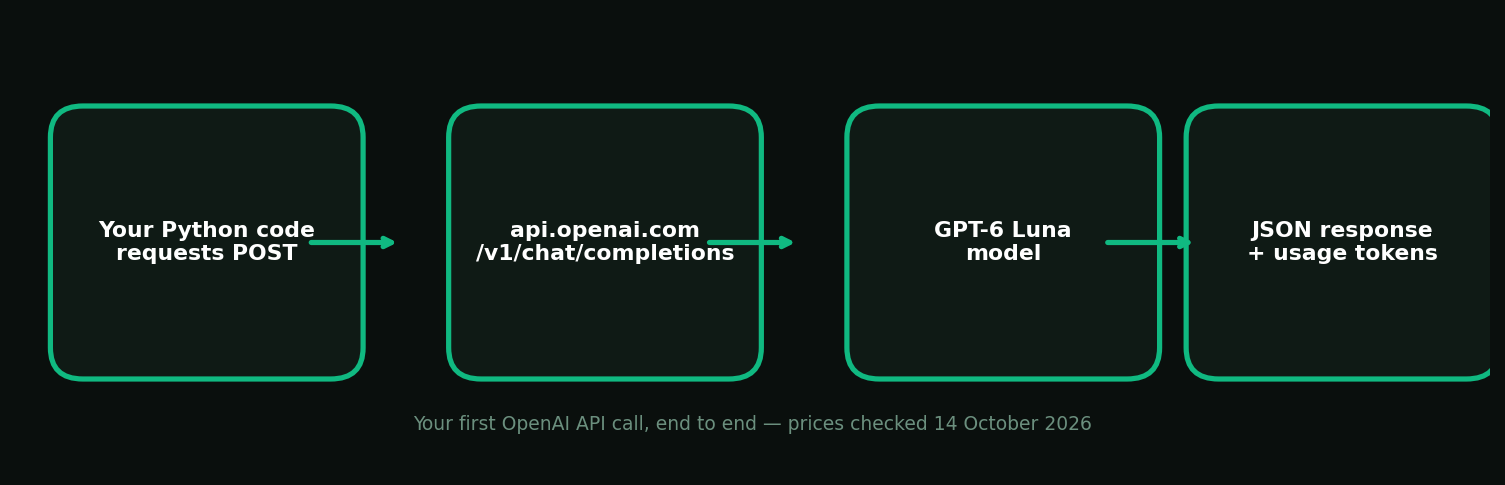
A few things worth noticing in the code: the model string is the current ID (gpt-6-luna — model IDs change over time, so check the model catalog rather than trusting an old tutorial), and response.usage tells you the input/output token counts, which is how you'll audit costs while learning.
Which model to use — and what it costs#
OpenAI's current lineup (short-context prices, checked 14 October 2026):
| Model | Input /1M tokens | Cached input /1M | Output /1M tokens | Context |
|---|---|---|---|---|
| GPT-6 Luna | $0.10 (৳12.35) | $0.01 (৳1.23) | $0.50 (৳61.73) | 1.05M |
| GPT-6.1 Sol | $2.00 (৳246.90) | $0.10 (৳12.35) | $10.00 (৳1,234.50) | 1.05M |
| GPT-6 Astra | $10.00 (৳1,234.50) | $1.00 (৳123.45) | $50.00 (৳6,172.50) | 1.05M |
Model prices checked 14 October 2026 from current pricing aggregators; USD/BDT at ৳123.45 the same day. OpenAI's pricing page is the authority — prices change.
For learning, start with GPT-6 Luna. It's the cheapest current model and still handles chat, summarization, and prototyping fine. Move to GPT-6.1 Sol when you need stronger reasoning or better code quality, and only reach for Astra for the hardest workloads — a single Astra request costs 100x what Luna charges per token.
The cost of that very first request, worked out: say your prompt is 500 input tokens and the answer is 200 output tokens on Luna. Input: 0.0005M × $0.10 = $0.00005. Output: 0.0002M × $0.50 = $0.0001. Total: $0.00015 — about ৳0.02. A $5 first top-up buys roughly 28,000 short requests at Luna's price (a 1K-token request at an 80/20 input-output mix costs about $0.00018). Beginner API usage is not expensive; unmonitored loops are.
Step 5: Learn the dashboard basics#
Before you build anything serious, spend five minutes in the dashboard:
- Usage page — every request, token counts, and cost. Check this after each experiment while learning.
- Rate limits — OpenAI grants usage tiers (Build, Launch, Grow); higher spend unlocks higher per-minute request and token limits. You won't hit the defaults while learning, but you'll hit them the first time a real app gets traffic.
- Error codes —
401means your key is wrong or revoked;429means you're rate-limited or out of credits;insufficient_quotameans the credit balance is empty. All three have obvious fixes once you know where to look.
What to do next#
Once the first call works, the real learning begins: system prompts, conversation history, streaming, and function calling. Two internal next steps on this site:
- Use any LLM with the OpenAI SDK — change one
base_urlline and your working code talks to 60+ models, including the whole model catalog, without rewriting anything. This is also how you get local BDT billing through the setup docs. - tokens.bd vs OpenRouter vs direct APIs — a comparison of what changes (and what stays the same) when you route your OpenAI-compatible code through a gateway.
How to use the OpenAI API FAQ#
Is the OpenAI API free? No — the API is a paid, per-token service billed through the Platform dashboard, separate from any ChatGPT subscription. You prepay for credits and each request deducts its token cost. Credits don't expire on active accounts, and learning-scale usage costs pennies.
How much does one API request cost?
It depends on the model and token counts. On GPT-6 Luna ($0.10/$0.50 per 1M input/output tokens), a typical 1K-token request costs about $0.00018. On GPT-6.1 Sol ($2/$10), the same request costs about $0.0036. Always check response.usage to see your token counts.
Which OpenAI model should a beginner use?
GPT-6 Luna (gpt-6-luna). It's the cheapest current model and handles chat, summarization, and prototyping well. Upgrade to GPT-6.1 Sol when you need stronger reasoning or code quality — a single request on the top tier costs 100x more per token, so don't learn on it.
What should I do if I lose my API key? You can't recover a lost key. Revoke it in the API keys dashboard and create a new one, then update your environment variable. This is why one key per project matters — revoking a leaked key doesn't break your other projects.
Can I use the OpenAI Python SDK with tokens.bd?
Yes — point the SDK at a different base_url and pass a tokens.bd key instead. Your code, including model calls and streaming, works unchanged across 60+ models. See the base_url guide for the one-line change.
Model prices checked 14 October 2026. Pricing, model IDs, and billing policies change — OpenAI's platform docs are the authority, and the model catalog is the authority for tokens.bd prices.
Sources: OpenAI Platform quickstart · GPT-6.1 Sol pricing & benchmark notes (Oct 2026) · OpenAI model pricing per 1M tokens (checked Oct 14, 2026) · OpenAI API pricing (updated Oct 14, 2026) · LLM API pricing comparison (Oct 10, 2026)