
TL;DR: Function calling lets a model request the execution of your code: you describe tools as JSON schemas in the request, the model replies with structured
tool_callsinstead of text, you run the function and send the result back, and the model writes its final answer. The three providers use different parameter shapes — OpenAI'stoolswrapper vs. Anthropic's flatinput_schemavs. Gemini'sfunctionDeclarations— and the most common production bug is forgetting that OpenAI returnsargumentsas a JSON string you must parse. Parameter names verified against official docs 20 October 2026.
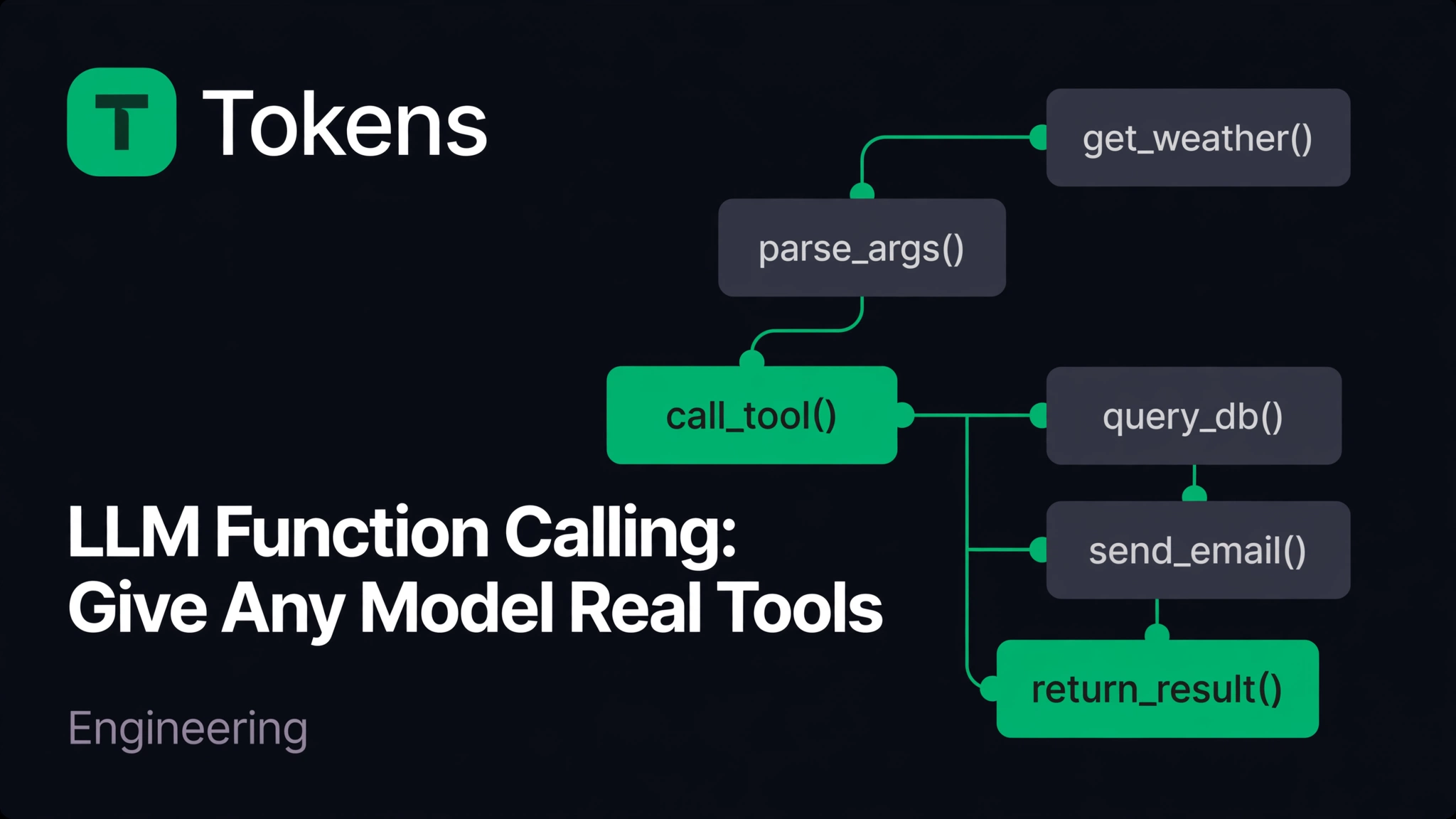
An LLM is a brilliant autocomplete engine with no hands. It can describe the weather in Dhaka, but it cannot check it. It can explain your database schema, but it cannot run a query. Function calling — called "tool use" by Anthropic — is the API mechanism that gives the model hands: you hand it a menu of your functions as JSON schemas, and the model tells you which function to run and with what arguments, in structured form, whenever the user's request needs one.
This is the foundation under every coding agent, RAG pipeline, and "AI assistant" that does anything real. And it is also the source of a disproportionate share of production bugs, because the request/response shapes differ across providers in exactly the ways that break naive abstractions. This post covers the mechanism, the exact shapes for OpenAI, Anthropic, and Gemini, and the failure modes to design around.
If you came from yesterday's post on structured outputs, note the difference: structured outputs force the model's reply into your JSON schema; function calling lets the model invoke your code mid-conversation. They answer different questions, and the strict-mode rules from that post apply to tool schemas too.
How the tool-call loop works#
The model never executes anything. That is the single most important sentence in this post. Function calling is a two-turn conversation with your code in the middle:
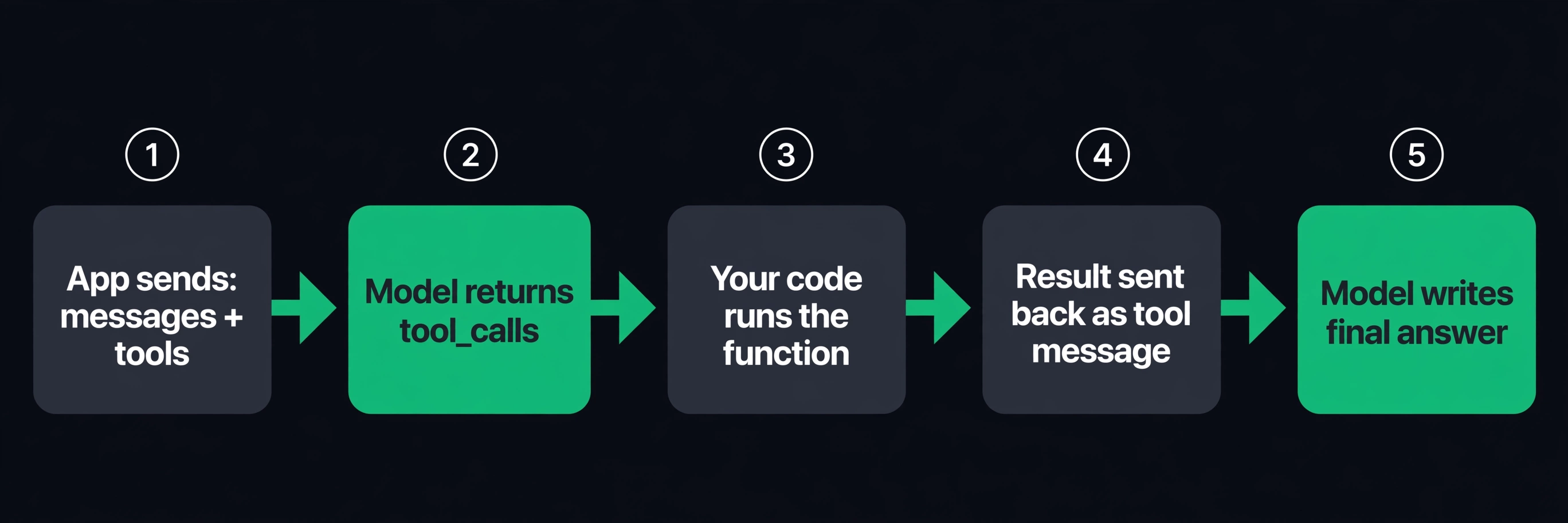
- Your app sends the conversation (
messages) plus atoolsarray: each tool is a name, a description, and a JSON Schema for its arguments. - The model decides whether any tool helps. If yes, it stops generating text and returns a structured
tool_callspayload: tool name + arguments as data, not prose. - Your code runs the named function with those arguments. The model has no network access, no shell, no database — this step is entirely yours.
- You send the result back as a new message with the
toolrole (OpenAI) or atool_resultblock (Anthropic), tagged with the call's ID. - The model reads the result and writes the final answer to the user, in natural language.
The loop can repeat: the model can call tools, see results, and call more tools. That is what an agent is, mechanically — a while-loop around this cycle.
Two consequences fall out of the design. First, the model chooses tools by reading your description fields; a vague description is the #1 cause of wrong tool selection, and provider docs say so explicitly. Second, tool definitions travel as input tokens on every request, so a bloated schema taxes every turn of the conversation — keep schemas tight, and put stable prefixes where prompt caching can absorb them (see prompt caching compared across providers).
OpenAI: tools with the function wrapper#
On the Chat Completions API (POST /v1/chat/completions), each tool is an object with a nested function definition. Verified against OpenAI's function-calling guide and the Chat API reference, 20 October 2026:
{
  "type": "function",
  "function": {
    "name": "get_weather",
    "description": "Get the current weather for a city.",
    "parameters": {
      "type": "object",
      "properties": {
        "city": { "type": "string", "description": "City name, e.g. 'Dhaka'" },
        "unit": { "type": "string", "enum": ["celsius", "fahrenheit"] }
      },
      "required": ["city"],
      "additionalProperties": false
    },
    "strict": true
  }
}
strict: true (optional but recommended) applies the same grammar rules as structured outputs: all fields in required, additionalProperties: false, no loose schemas. It makes the model far less likely to invent arguments your function doesn't accept.
The model's reply, when it wants a tool, carries tool_calls on the message — with finish_reason: "tool_calls" instead of "stop":
"tool_calls": [{
  "id": "call_abc123",
  "type": "function",
  "function": {
    "name": "get_weather",
    "arguments": "{\"city\":\"Dhaka\",\"unit\":\"celsius\"}"
  }
}]
Note the trap: arguments is a JSON string, not an object. You must json.loads it. Half the "function calling is broken" bug reports are this line.
The full loop through an OpenAI-compatible gateway:
from openai import OpenAI
import json

client = OpenAI(base_url="https://tokens.bd/v1", api_key="<redacted>")

def get_weather(city: str, unit: str = "celsius") -> dict:
    # your implementation: HTTP call, DB query, whatever
    ...

tools = [{ "type": "function", "function": { ... } }]  # schema above

messages = [{"role": "user", "content": "What's the weather like in Dhaka right now?"}]

response = client.chat.completions.create(
    model="openai/gpt-5.6-sol",
    messages=messages,
    tools=tools,
)
msg = response.choices[0].message

if msg.tool_calls:
    messages.append(msg)  # the assistant's tool-call message goes back into history
    for call in msg.tool_calls:  # parallel calls: one result message per call
        args = json.loads(call.function.arguments)
        result = get_weather(**args)  # YOUR code runs here
        messages.append({
            "role": "tool",
            "tool_call_id": call.id,   # must match the call id exactly
            "content": json.dumps(result),
        })
    final = client.chat.completions.create(
        model="openai/gpt-5.6-sol", messages=messages, tools=tools
    )
    print(final.choices[0].message.content)
tool_choice controls eagerness: "auto" (default — the model decides), "required" (must call at least one), "none", or a forced specific function {"type": "function", "function": {"name": "get_weather"}}. One caveat from the docs: OpenAI's newer Responses API uses a different, flat shape — the tool definition drops the function wrapper ({"type": "function", "name": ..., "parameters": {...}}), and results come back as function_call_output items. If you're on the Responses API, don't copy Chat Completions shapes verbatim.
Anthropic: flat tools, input_schema, tool_result#
Anthropic's Messages API (POST /v1/messages) skips the wrapper — tool fields sit at the top level of each tool object. Verified against Anthropic's tool-use docs, 20 October 2026:
{
  "name": "get_weather",
  "description": "Get the current weather for a city. Use this whenever the user asks about current conditions.",
  "input_schema": {
    "type": "object",
    "properties": {
      "location": { "type": "string", "description": "City name, e.g. 'Dhaka'" },
      "unit": { "type": "string", "enum": ["celsius", "fahrenheit"] }
    },
    "required": ["location"]
  }
}
Constraints worth knowing: name must match ^[a-zA-Z0-9_-]{1,128}$, and Anthropic's docs single out the description as the most important factor in whether the model picks the right tool. tool_choice is an object, not a string: {"type": "auto"} (default), {"type": "any"} (must call one), {"type": "tool", "name": "get_weather"} (force one), {"type": "none"}. Caution: per the docs, forcing a choice (any/tool) returns a 400 on some models — prefer auto with strict tool schemas.
The response uses stop_reason: "tool_use" and content blocks. Crucially, input arrives as a pre-parsed JSON object — no json.loads needed, unlike OpenAI:
"content": [{
  "type": "tool_use",
  "id": "toolu_abc123",
  "name": "get_weather",
  "input": { "location": "Dhaka", "unit": "celsius" }
}]
Results go back as a user message containing tool_result blocks — one per tool_use, all in a single message for parallel calls — with an optional is_error: true flag when your function fails:
{
  "role": "user",
  "content": [{
    "type": "tool_result",
    "tool_use_id": "toolu_abc123",
    "content": "31°C, partly cloudy"
  }]
}
content accepts a plain string, nested text blocks, or even document blocks (handy for returning file contents). Reporting is_error: true on failures — instead of crashing the loop — lets the model recover: retry, try a different tool, or explain the problem to the user.
Gemini: functionDeclarations and functionResponse#
Gemini's generateContent API nests declarations one level deeper. Verified against Google's function-calling docs, 20 October 2026:
"tools": [{
  "functionDeclarations": [{
    "name": "get_current_weather",
    "description": "Get the current weather for a city.",
    "parameters": {
      "type": "object",
      "properties": {
        "location": { "type": "string", "description": "City name" }
      },
      "required": ["location"]
    }
  }]
}]
Declaration rules: names start with a letter or underscore, allow letters/digits/_/_/-, max 64 characters; up to 128 declarations per request. parameters uses OpenAPI 3.0 schema types (STRING, INTEGER, BOOLEAN, NUMBER, ARRAY, OBJECT). The model returns functionCall parts:
"parts": [{ "functionCall": {
  "name": "get_current_weather",
  "args": { "location": "Dhaka" }
}}]
and the result returns in the next request as a user-role part:
{ "role": "user", "parts": [{
  "functionResponse": {
    "name": "get_current_weather",
    "response": { "temperature_c": 31, "condition": "partly cloudy" }
  }
}]}
Eagerness is set via toolConfig.functionCallingConfig: mode of "AUTO" (default), "NONE", or "ANY" (must call, optionally restricted with allowed_function_names).
The three shapes, side by side#
| OpenAI (Chat Completions) | Anthropic (Messages) | Gemini (generateContent) | |
|---|---|---|---|
| Tool definition | tools: [{type:"function", function:{name, description, parameters, strict}}] | tools: [{name, description, input_schema}] — no wrapper | tools: [{functionDeclarations: [{name, description, parameters}]}] |
| Model's call | message.tool_calls[] with function.arguments as a JSON string | content blocks of type: "tool_use" with input as a parsed object | parts[] with functionCall: {name, args} |
| Stop signal | finish_reason: "tool_calls" | stop_reason: "tool_use" | functionCall part present |
| Result message | {"role":"tool", "tool_call_id": id, "content": "..."} | user message with {"type":"tool_result", "tool_use_id": id, ...} | user part with {"functionResponse": {name, response}} |
| Force a tool | tool_choice: "required" or {"type":"function","function":{"name":...}} | {"type":"any"} / {"type":"tool","name":...} (400s on some models — check docs) | functionCallingConfig: {mode:"ANY", allowed_function_names:[...]} |
Note the asymmetry that breaks cross-provider wrappers: OpenAI wraps (function.), Anthropic is flat, Gemini nests declarations. If you abstract over providers, normalize at your boundary — don't leak one provider's shape into your tool registry.
Failure modes that break production agents#
1. Unparsed arguments. OpenAI gives you a string. json.loads it, and handle the parse error — with strict: true it's rare, without it, expect the occasional malformed payload on long argument lists.
2. Hallucinated tools and arguments. The model sometimes calls a function you didn't define, or passes arguments outside your schema. This is a description and schema problem, not a model defect: precise descriptions, enum constraints, additionalProperties: false, and server-side validation of every call before execution. Never execute a tool call you haven't validated — treat tool calls like untrusted user input.
3. Dropped parallel calls. When the model issues several tool_calls at once, every one needs its result message before the next model turn, with IDs matching exactly. A loop that handles only the first call silently corrupts the conversation.
4. Schema bloat. Tool definitions are input tokens on every request in the turn. Twenty tools with verbose schemas can cost more in definition tokens than the actual work. Keep descriptions to one or two sentences, drop fields the model doesn't need, and lean on prompt caching for stable prefixes.
5. Infinite tool loops. A model that keeps calling tools without ever answering burns budget fast. Cap loop iterations (5–10 is typical), and set a per-key spend ceiling so one bug can't drain an account — per-key spend caps exist for exactly this.
6. Destructive tools without confirmation. Read-only tools (search, lookup, calculate) are safe to auto-run. Anything that writes, sends, deletes, or spends needs a human confirmation step or a strict allowlist — the model cannot tell your staging database from production.
Function calling through tokens.bd#
If you access models through tokens.bd, the mechanics above don't change — only three lines do. The gateway exposes OpenAI- and Anthropic-compatible endpoints (see the docs), so the same tools parameter travels with the request: point the SDK at https://tokens.bd/v1 (OpenAI-style) or https://tokens.bd (Anthropic-style), swap the model name for one in the catalog — e.g. openai/gpt-5.6-sol, anthropic/claude-sonnet-5.5, or google/gemini-3.8-flash — and use your tokens.bd key. The one-base_url-change pattern applies verbatim.
Two gateway-specific notes for tool-calling workloads: tool-heavy agent loops are bursty and retry-prone, which is exactly the traffic shape that trips rate limits — the gateway's provider failover keeps a 429 on one backend from breaking your loop. And because a runaway loop is the most expensive bug in this post, put a spend cap on the key before you ship the agent.
FAQ#
What's the difference between function calling and structured outputs? Structured outputs constrain the model's reply to your JSON schema (see yesterday's guide). Function calling lets the model request execution of your code mid-conversation and continue after seeing the result. Use structured outputs for extraction, function calling for actions and live data.
Does the model actually run my function? No — never. The model returns a structured request (name + arguments); your code executes it. Any "AI agent" that runs shell commands or database queries does so because the developer wrote the execution step, not because the model has access.
Which tool_choice should I use?
auto (the default) for almost everything. Forcing (required / any / named) is for narrow pipelines where a tool call is mandatory — and on Anthropic, forced choice 400s on some models, so check the current docs for yours.
How many tools can I define? Gemini caps at 128 function declarations per request; OpenAI and Anthropic don't publish hard caps, but large menus degrade tool selection and inflate input tokens. In practice, keep it under ~20 well-described tools; route to more via a dispatcher tool if you need scale.
Do tool calls cost extra? No per-call fee — but tool definitions bill as input tokens on every request, results bill as input on the follow-up turn, and each loop iteration is another full request. A 10-turn agent loop costs roughly 10 requests' worth of tokens plus schemas. Budget accordingly.
Sources: OpenAI function-calling guide · OpenAI Chat API reference · Anthropic tool-use overview · Google Gemini function-calling docs · Google function-calling model reference · tokens.bd model catalog (model IDs verified 20 October 2026)
Angle note for the pipeline: this post answers "how do I give a model tools it can call, and what does the request/response look like on each provider" — the 19 Oct structured-outputs post answers "how do I force valid JSON from a model", a different question; no post in the last 14 days covers tool/function calling.
When a tool call's purpose is only a yes/no, choice, or score, a typed decision call replaces parsing — see OpenAI Decisions API vs Jev: Decisions Without the Essay.